How to Create Horizontal Tabs Menu in Blogger – Part 2

Few day ago, I received some comments from my reader regarding my last post on How to Create Horizontal Tabs Menu in Blogger. They use my method to create the horizontal tab but at the end, they created a bulleted list of links. So I decide to log in my blogger account and take a look for this issue.
After testing on several of blogger template, the original code create vertical tab instead of horizontal tab.
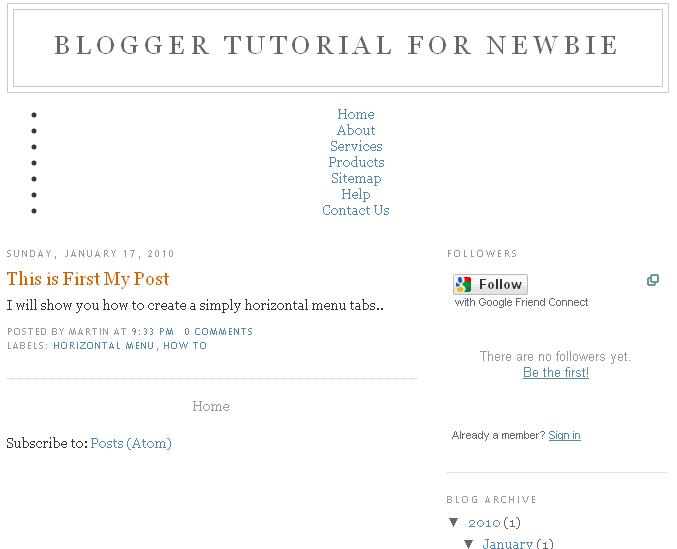
Therefore, I check the code again and what I found was the CSS code was missing after change the template. As you can see as above picture. Seem like this is Blogger‘s problem and I have not idea why the CSS code is missing every time I change a new template. Without the CSS code, there will be no horizontal tab.
How do we create the horizontal tab? Basically, we need 2 different code i.e. widget Code and CSS code. The widget code create a list of links and CSS code change the style of the links into horizontal tab.
Therefore, without the CSS code, your links will be vertical tab as default.
Widget code: Create the list of links
<ul id=”nav”>
<li><a href=”#”>Home</a></li>
<li><a href=”#”>About</a></li>
<li><a href=”#”>Services</a></li>
<li><a href=”#”>Products</a></li>
<li><a href=”#”>Sitemap</a></li>
<li><a href=”#”>Help</a></li>
<li><a href=”#”>Contact Us</a></li></ul>
The Solution:
I copy all the Missing CSS code (as below) again and then paste into the template HTML Code (you need to expand widget templates to see the whole template HTML code) before ” ]]></b:skin>”.
CSS Code: change the links into horizontal tab
#nav
{
padding:0;
}#nav li
{
display:inline;
}#nav li a
{
font-family:Arial;
font-size:12px;
text-decoration: none;
float:left;
padding:10px;
background-color: #333333;
color:#ffffff;
border-bottom:1px;
border-bottom-color:#000000;
border-bottom-style:solid;
}#nav li a:hover
{
background-color:#9B1C26;
padding-bottom:12px;
border-bottom:2px;
border-bottom-color:#000000;
border-bottom-style:solid;
margin:-1px;
}
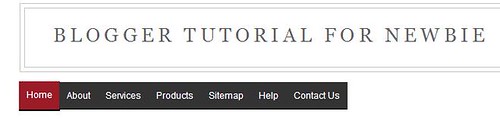
After I added the missing CSS code, I create the horizontal tab at my template.
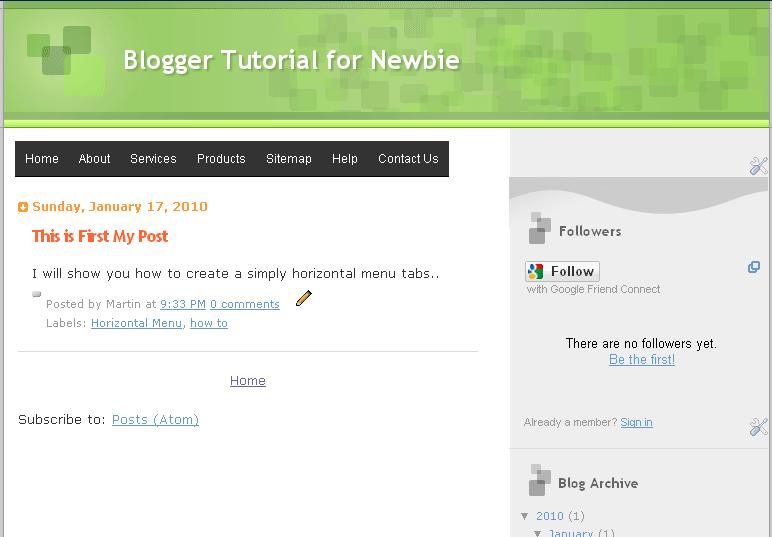
I hope this solution can resolve all my reader’s problem. 🙂
IF above solution still not solve your problem then drop me a comment and I will look into your blogger‘s code.






Genial dispatch and this mail helped me alot in my college assignement. Thank you on your information.
Hi! can you please take a look at my code. Sorry but I can not change the links to tabs. Is it the template that I am using? I tried adding the widget but now I have the pagelist and the widget. Wheres the error. THANK YOU!
<![CDATA[/*
———————————————–
Blogger Template Style
Name: Beautiful Day
Author: Klodian
URL: http://www.deluxetemplates.net
Date: November 2009
License: This free Blogger template is licensed under the Creative Commons Attribution 3.0 License, which permits both personal and commercial use.
However, to satisfy the 'attribution' clause of the license, you are required to keep the footer links intact which provides due credit to its authors. For more specific details about the license, you may visit the URL below:
http://creativecommons.org/licenses/by/3.0/
———————————————– */
#navbar-iframe {
display: none !important;
}
/* Variable definitions
====================
*/
/* Use this with templates/template-twocol.html */
body {
-moz-background-clip:border;
-moz-background-inline-policy:continuous;
-moz-background-origin:padding;
background:#86CDDB url(http://3.bp.blogspot.com/_iI6SgnnhWEM/Sw_SZONdThI/AAAAAAAAAp8/hI9mmthzDOs/s1600/bg.gif) repeat scroll 0 0;
color:#333333;
font-family:Georgia Serif;
font-size:small;
font-size-adjust:none;
font-stretch:normal;
font-style:normal;
font-variant:normal;
font-weight:normal;
line-height:normal;
margin:0;
text-align:center;
}
a:link {
color:#5588AA;
text-decoration:none;
}
a:visited {
color:#5588AA;
text-decoration:none;
}
a:hover {
color:#E43C59;
text-decoration:underline;
}
a img {
border-width:0;
}
#header-wrapper {
-moz-background-clip:border;
-moz-background-inline-policy:continuous;
-moz-background-origin:padding;
background:#86CDDB url(http://2.bp.blogspot.com/_iI6SgnnhWEM/Sw_SicEPnpI/AAAAAAAAAqE/cXltmsRHGd8/s1600/header.jpg) no-repeat scroll center top;
height:403px;
margin:0 auto;
width:1004px;
}
#header-inner {
background-position:center center;
margin-left:auto;
margin-right:auto;
}
#header {
color:#E43C59;
text-align:left;
}
#header h1 {
font-family:Georgia,Serif;
font-size:35px;
font-size-adjust:none;
font-stretch:normal;
font-style:italic;
font-variant:normal;
font-weight:bold;
letter-spacing:-1px;
line-height:normal;
margin:0;
padding:45px 20px 3px 80px;
text-transform:none;
}
#header a {
color:#E43C59;
text-decoration:none;
}
#header a:hover {
color:#E43C59;
}
#header .description {
color:#558E09;
font-family:arial;
font-size:14px;
font-size-adjust:none;
font-stretch:normal;
font-style:normal;
font-variant:normal;
font-weight:normal;
letter-spacing:0.2em;
line-height:normal;
margin:0;
max-width:700px;
padding:0 20px 15px 80px;
text-transform:none;
}
#header img {
margin-left:auto;
margin-right:auto;
}
#outer-wrapper {
font-family:arial,helvetica,times New Roman;
font-size:100%;
font-size-adjust:none;
font-stretch:normal;
font-style:normal;
font-variant:normal;
font-weight:normal;
line-height:normal;
margin:0 auto;
text-align:left;
width:1004px;
}
#main-wrapper {
float:left;
margin-left:70px;
margin-top:-83px;
overflow:hidden;
width:550px;
word-wrap:break-word;
}
#sidebar-wrapper {
float:right;
margin-right:75px;
margin-top:-50px;
overflow:hidden;
width:233px;
word-wrap:break-word;
}
h2 {
-moz-background-clip:border;
-moz-background-inline-policy:continuous;
-moz-background-origin:padding;
background:transparent url(http://3.bp.blogspot.com/_iI6SgnnhWEM/Sw_Sr2Su7FI/AAAAAAAAAqM/VT55rMDrqtI/s1600/topbar.gif) no-repeat scroll center top;
color:#000000;
font-family:georgia;
font-size:16px;
font-size-adjust:none;
font-stretch:normal;
font-style:italic;
font-variant:normal;
font-weight:normal;
height:35px;
letter-spacing:0;
line-height:1.4em;
margin:0;
padding-left:10px;
padding-top:21px;
text-transform:none;
}
h2.date-header {
-moz-background-clip:border;
-moz-background-inline-policy:continuous;
-moz-background-origin:padding;
background:transparent none repeat scroll 0 0;
color:#777777;
font-size:12px;
font-style:italic;
font-weight:normal;
height:17px;
margin:0;
padding:0;
}
.post {
margin:0.5em 0 1.5em;
padding-bottom:1.5em;
}
.post h3 {
color:#3EBDFF;
font-size:22px;
font-weight:normal;
line-height:1.4em;
margin:0.25em 0 0;
padding:0 0 4px;
}
.post h3 a, .post h3 a:visited, .post h3 strong {
color:#3EBDFF;
display:block;
font-weight:bold;
text-decoration:none;
}
.post h3 strong, .post h3 a:hover {
color:#E43C59;
}
.post-body {
font-size:14px;
line-height:1.6em;
margin:0 0 0.75em;
}
.post-body blockquote {
line-height:1.3em;
}
.post-footer {
border-top:1px solid #CCCCCC;
color:#666666;
font-family:georgia;
font-size:12px;
font-size-adjust:none;
font-stretch:normal;
font-style:italic;
font-variant:normal;
font-weight:normal;
letter-spacing:0;
line-height:1.4em;
margin:0.75em 0;
padding-left:8px;
padding-top:5px;
text-transform:none;
}
.comment-link {
margin-left:0.6em;
}
.post img {
border:1px solid #CCCCCC;
padding:1px;
}
.post blockquote {
font-family:georgia;
font-style:italic;
margin:1em 20px;
}
.post blockquote p {
margin:0.75em 0;
}
#comments h4 {
color:#666666;
font-weight:bold;
letter-spacing:0;
line-height:1.4em;
margin:1em 0;
text-transform:none;
}
#comments-block {
line-height:1.6em;
margin:1em 0 1.5em;
}
#comments-block .comment-author {
-moz-background-clip:border;
-moz-background-inline-policy:continuous;
-moz-background-origin:padding;
background:#EEEEEE none repeat scroll 0 0;
margin:0.5em 0;
padding-bottom:4px;
padding-left:8px;
padding-top:4px;
}
#comments-block .comment-body {
border-left:1px solid #EEEEEE;
border-right:1px solid #EEEEEE;
margin-top:-7px;
padding-left:10px;
padding-top:10px;
}
#comments-block .comment-footer {
border-bottom:1px solid #EEEEEE;
border-left:1px solid #EEEEEE;
border-right:1px solid #EEEEEE;
font-size:11px;
line-height:1.4em;
margin:-0.25em 0 2em;
padding-bottom:5px;
padding-left:10px;
text-transform:none;
}
#comments-block .comment-body p {
margin:0;
padding-bottom:15px;
}
.deleted-comment {
color:gray;
font-style:italic;
}
#blog-pager-newer-link {
float:left;
}
#blog-pager-older-link {
float:right;
}
#blog-pager {
text-align:center;
}
.feed-links {
clear:both;
line-height:2.5em;
}
.sidebar {
color:#666666;
font-size:14px;
line-height:1.5em;
}
.sidebar ul {
list-style-image:none;
list-style-position:outside;
list-style-type:none;
margin:0;
padding:0;
}
.sidebar li {
-moz-background-clip:border;
-moz-background-inline-policy:continuous;
-moz-background-origin:padding;
background:transparent url(http://2.bp.blogspot.com/_iI6SgnnhWEM/Sw_S0SY_vDI/AAAAAAAAAqU/6_KAEIqjjuU/s1600/arrow.gif) no-repeat scroll left center;
line-height:1.5em;
margin:0;
padding:0 0 0.25em 18px;
}
.sidebar .widget, .main .widget {
margin:0 0 1.5em;
}
.main .Blog {
border-bottom-width:0;
}
.profile-img {
border:1px solid #CCCCCC;
float:left;
margin:0 5px 5px 0;
padding:4px;
}
.profile-data {
color:#999999;
font-family:’Trebuchet MS’,Trebuchet,Arial,Verdana,Sans-serif;
font-size:78%;
font-size-adjust:none;
font-stretch:normal;
font-style:normal;
font-variant:normal;
font-weight:bold;
letter-spacing:0.1em;
line-height:1.6em;
margin:0;
text-transform:uppercase;
}
.profile-datablock {
margin:0.5em 0;
}
.profile-textblock {
line-height:1.6em;
margin:0.5em 0;
}
.profile-link {
font-family:’Trebuchet MS’,Trebuchet,Arial,Verdana,Sans-serif;
font-size:78%;
font-size-adjust:none;
font-stretch:normal;
font-style:normal;
font-variant:normal;
font-weight:normal;
letter-spacing:0.1em;
line-height:normal;
text-transform:uppercase;
}
#footer {
-moz-background-clip:border;
-moz-background-inline-policy:continuous;
-moz-background-origin:padding;
background:transparent url(http://2.bp.blogspot.com/_iI6SgnnhWEM/Sw_S-6L537I/AAAAAAAAAqc/tWI6pnn2nQc/s1600/footer.gif) no-repeat scroll center bottom;
color:#88CFDE;
float:left;
font-family:arial,verdana,sans-serif;
font-size:12px;
font-size-adjust:none;
font-stretch:normal;
font-style:normal;
font-variant:normal;
font-weight:normal;
height:84px;
line-height:normal;
position:relative;
text-align:center;
width:1004px;
}
.footerlinks {
color:#666666;
float:left;
font-family:georgia;
font-style:italic;
margin-left:100px;
padding-top:21px;
text-align:left;
width:800px;
}
#content-wrapper {
-moz-background-clip:border;
-moz-background-inline-policy:continuous;
-moz-background-origin:padding;
background:transparent url(http://2.bp.blogspot.com/_iI6SgnnhWEM/Sw_THN38uII/AAAAAAAAAqk/Sq-tYgRwtpg/s1600/content-bg.gif) repeat-y scroll 0 0;
}
.widget-content {
padding-left:10px;
}
]]>
skip to main |
skip to sidebar
Copyright 2009
. Powered by Blogger.
Blogger Templates created by Deluxe Templates
WP Themes by
Wpthemesfree