How to use Keyword Match Types in Google Search?

Google is the one of the most popular search engine in the world with market share above 60% worldwide (mean that more than 60% internet user use google).
There is some useful tips that i would like to share with my reader regarding how to use keyword match types in google.

There are 3 type of keyword match types:
(1) Broad Match
This is popular match type that people use in google search engine to find some products or information. By using this matching option, google will return all the information or search results that match with all of your keywords.
How to use broad match? Just simple type your keywords or phrase without quote, bracket or etc. in google.
Example: I just put “Car GPS System” (without quote or bracket) in google and hit serach.
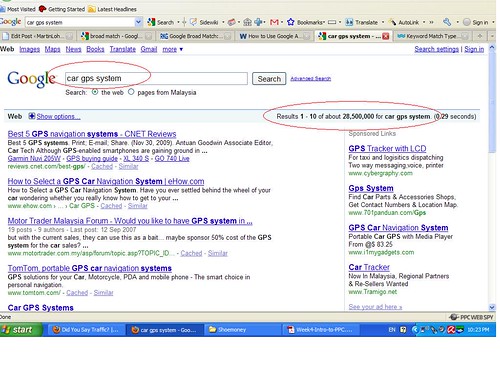 Google returned 28,500,000 web pages. What is this number mean?
If you using broad match to search “Car GPS System”. Google will search and return all the web pages include blog that contains keyword:”Car”,”GPS” and “system”. There are 28,500,000 web pages that contains keyword “Car”,”GPS” and “system”.
More of the results are irrelevant to what i am looking for.
In this case, you will received results like:
Best GPS navigator System (relevant)
Car audio System (irrelevant)
Air condition System (irrelevant)
(2) Phrase Match
When you put “quotes” around your keywords or phrase, you are telling google that you only want results that with phrase in the same order.
I use the same keyword phrase again, but this time add with “quotes” around my keyword phrase.
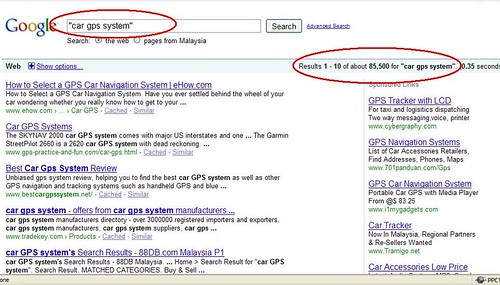
This time, google only return 85,500 results. I received results which more relevant to what i want.
If you are using phrase match in google. Google will return results that match with your keyword phrase.
Some of the results that i received:
Best Car GPS System Review (relevant)
How to select Car GPS System (relevant)
Car GPS System for your car (relevant)
(3) Exact Match
If you put [bracket] around your keyword phrases, you are telling to google that you only want results that exact phrase in the exact order, word for word, nothing more and nothing less.
I just simply put [bracket] around my keyword phrase ( [Car GPS system] ) in google search and google will return results/web pages that only with the exact keyword phrase that you are looking for.
In this case, i only received result that contains:
Car GPS System (relevant)
My two cents:
I always use broad match for my normal search in google, google usually return the most relevant result in its page 1 SERP (Search Enginer Result Pages).
I only use phrase match and exact match for my keyword research in internet marketing. I will teach you how to do some simple keyword and market research to find some profitable products to sell.
Kindly stay tune to my next post. 🙂




No comments yet.